Best webinar platforms for every business use case
Date added: 4/08/2026

The best webinar platform is not a single product. It is whichever platform category matches your primary job: enterprise broadcast to thousands of staff, lead-generation webinars for sales, evergreen automated funnels, or a hybrid broadcast mixing a live room with a remote audience. Pick the category first, then shortlist vendors inside it.
Firefly AV is an AV hire and event production company based in Leeds and Preston, working UK-wide on everything from internal town halls to broadcast-grade hybrid conferences. We are not a software vendor, but we build the physical production layer, cameras, sound, vision switching, staging, that sits behind a webinar platform whenever the stakes go beyond a laptop camera and a headset mic.
This article gives you:
- GBP price bands for entry, mid-market and enterprise webinar software, with a worked total-cost-of-ownership example
- A features checklist covering engagement, branding, security and accessibility
- Real day-rate guidance for the kit and crew needed when a webinar becomes a broadcast
- A decision checklist and the exact questions to put to any vendor before you sign
Key Takeaways
The right webinar platform is decided by the event’s core job, lead generation, internal training, enterprise broadcast or hybrid production, not by a generic feature comparison.
| Point | Details |
|---|---|
| Match category to goal | Choose enterprise, lead-gen, evergreen, internal or virtual-event categories before comparing individual vendors. |
| Budget the true TCO | Entry plans from around £25–35/month can exceed £150/month once attendee tiers and add-ons are included. |
| Prioritise production for high-stakes events | Broadcast quality depends more on cameras, mics and mixing than on the software tier chosen. |
| Ask vendors the hard questions | Confirm data residency, content ownership, support SLAs and accessibility support before signing. |
| Bring in production support when it matters | Firefly AV supplies kit and crew, from Sennheiser mics to Absen LED walls, for hybrid webinars needing broadcast-grade delivery. |
Table of Contents
- Best webinar platforms by use case: which category fits your event?
- What features actually matter when comparing webinar software?
- How much do webinar platforms cost in the UK?
- What does it take to run a broadcast-quality hybrid webinar?
- How do you choose the right webinar platform? A decision checklist
- Why platform features matter less than most buying guides suggest
- Firefly AV: managed virtual and hybrid production services
- Sources
- FAQ
Best webinar platforms by use case: which category fits your event?
Software review sites tend to rank webinar platforms on feature counts. That is the wrong starting point. The right question is: what job does this webinar need to do? A platform built for internal training rarely handles a 5,000-seat product launch, and a platform tuned for lead generation often lacks the broadcast controls a hybrid conference needs. Work out your category first, then compare vendors within it.
1. Enterprise broadcast and town halls
If you are addressing a large, distributed workforce or a major public audience, the capability that matters most is reliability at scale, guaranteed uptime, verified attendee capacity, and support that answers the phone during the event, not after it. A typical example is a 3,000-employee all-hands meeting or a regulator-facing public briefing. Enterprise tiers from providers such as GoTo bundle role-based permissions, branded registration and dedicated reporting, and pricing sits in custom enterprise brackets rather than published self-serve tiers, often starting from roughly £250 to £300 per month upwards depending on attendee caps and support level.
2. Marketing lead-generation and conversion webinars
Here the deciding feature is not scale but conversion tooling: registration forms that sync to a CRM, polls that qualify intent mid-session, and analytics that tell sales who actually watched past minute 20. A software company running a monthly demo webinar for 200 to 500 prospects sits squarely in this bracket. Mid-market plans typically run from around £30 to £90 per month per organiser, though attendee-tiered pricing can push costs up quickly once you cross a few hundred registrants. If your team already knows which CRM and marketing stack you are wedded to, you can usually shortlist vendors yourself using integration compatibility as the primary filter, a useful reference point for webinar lead-generation tactics is how tightly the platform’s forms and tagging map onto your existing automation.
3. Evergreen and simulated-live webinars
Course creators, coaches and product-education teams often get more value from automation than from a live-only format. Simulated-live sessions, pre-recorded but presented with live chat and timed prompts, let one recording serve hundreds of registrants across different time zones without a presenter repeating themselves. Combined with a solid post-event asset workflow (clips, transcripts, follow-up sequences), evergreen formats can outperform live-only webinars for course creators specifically, provided the automation and follow-up are genuinely built out rather than bolted on. Expect to pay from around £25 to £90 per month depending on attendee volume and whether simulive is a core feature or a paid add-on.
4. Simple internal webinars
For a weekly team update or a 50-person internal briefing, the cheapest platform that reliably records and lets people raise their hand is usually the right answer. This is the one category where the free or entry tier of most mainstream platforms genuinely suffices, and adding enterprise features here is money spent on capability nobody will use.
5. Virtual-event platforms with embedded webinars
If your event is a multi-track conference with a lobby, exhibitor booths and session navigation rather than a single broadcast, you need a virtual-event platform rather than a webinar tool. Providers such as vFairs build the event shell (registration, lobby, networking) and then integrate an external webinar or conferencing tool like Zoom underneath to actually deliver each session. This lets organisers offload media delivery to a specialist while keeping the attendee journey polished, but it does mean pricing two products rather than one, so budget for both the event-platform licence and the underlying session tool.
6. Hybrid events with a production-first approach
Anything mixing a physical room with a remote audience, an awards night streamed to sponsors, a conference with a stage and a virtual ticket tier, needs webinar software that can accept a clean broadcast feed, not just a webcam. Here the platform choice becomes secondary to the AV build behind it. Budget for both software licensing and a production day rate, covered in detail further down this article.
Pro Tip: Before you shortlist a single vendor, write down the one metric that would make the event a failure, dropped connections, low conversion, poor recall, no recording. That failure mode tells you which category you are actually buying for.
As a rule, shortlist vendors yourself when your event fits neatly into categories 2, 3 or 4, the buying decision is mostly about software fit. Bring in a production partner when you are in category 1 or 6, where the physical broadcast quality determines whether the event succeeds regardless of which software licence you hold.
What features actually matter when comparing webinar software?
Feature lists on vendor websites are long by design. Most of what is listed will never touch your specific event. The checklist below groups features by what they actually change for the attendee or the organiser, so you can score shortlisted platforms against the things that move outcomes rather than the things that pad a comparison chart.
Engagement tools
- Live polls and instant results display, essential for lead-gen qualification and audience temperature-checks
- Threaded Q&A with moderator upvoting, so the best questions surface rather than the loudest
- Reactions and chat, useful for internal culture events, less critical for formal broadcasts
- Breakout rooms, valuable for training webinars, largely irrelevant for one-to-many broadcasts
Production and broadcast features
- A backstage or green room where presenters can prepare off-camera before going live
- Multi-scene layouts and simulive support, Zoom Webinars includes both plus AI-generated chapter markers for post-event navigation
- RTMP output, the single most important feature if you plan to stream to YouTube, LinkedIn Live or a broadcast partner simultaneously
- Support for external video inputs, required if a physical camera feed (via a device such as a Blackmagic Web Presenter) needs to reach the platform cleanly
Branding, registration and analytics
- Custom registration pages carrying your own branding, not a generic vendor template
- CRM and marketing-automation sync, so registrant data lands where your team actually works, CRM automation examples show how much follow-up value is lost when this integration is missing
- Attendance and engagement analytics broken down per registrant, not just aggregate totals
Accessibility and captioning
- Live captioning, increasingly expected rather than optional for public-facing and internal training content
- Screen-reader-compatible registration and viewing interfaces
- Downloadable transcripts, useful for compliance training and for repurposing content later
Security, data residency and reliability
- GDPR-compliant data handling and, where relevant, EU or UK data residency guarantees
- End-to-end encryption for sensitive internal briefings
- Published uptime commitments and a clear support escalation path, not just a support email address
Poor accessibility provision has a direct, measurable cost. When live captioning or transcript access is missing, organisers lose a meaningful slice of the audience who would otherwise have engaged with the full session, particularly relevant for any regulated or public-sector body running webinars under UK accessibility expectations. Firefly AV’s own guidance on making live events more accessible covers the same principle for physical events, and it applies just as directly online.
How much do webinar platforms cost in the UK?
Webinar pricing is genuinely confusing because headline prices rarely reflect what you will pay once you add the licences and attendee tiers most organisations actually need. Budgeting properly means separating the software licence from the extras that quietly inflate the bill.
Entry tier: small teams and internal use
Entry-level plans typically run from £25 to £35 per month. ClickMeeting sits around €26 to €32 per month at this level, and Zoom’s webinar add-on, layered onto an existing workplace licence, brings the effective cost closer to £75 to £90 per month once the base subscription is included. These tiers usually cap attendee numbers at 100 to 500 and offer limited branding.
Mid-market: regular external webinars with branding
Mid-market plans generally sit between £90 and £250 per month, covering custom branding, larger attendee caps and better analytics. RingCentral Events, for example, publishes clear GBP pricing for its Events Pro tier and above, offering unlimited events and registrations rather than charging per attendee, a meaningfully different cost structure from platforms that scale price with audience size.
Enterprise: large-scale, SLA-backed deployments
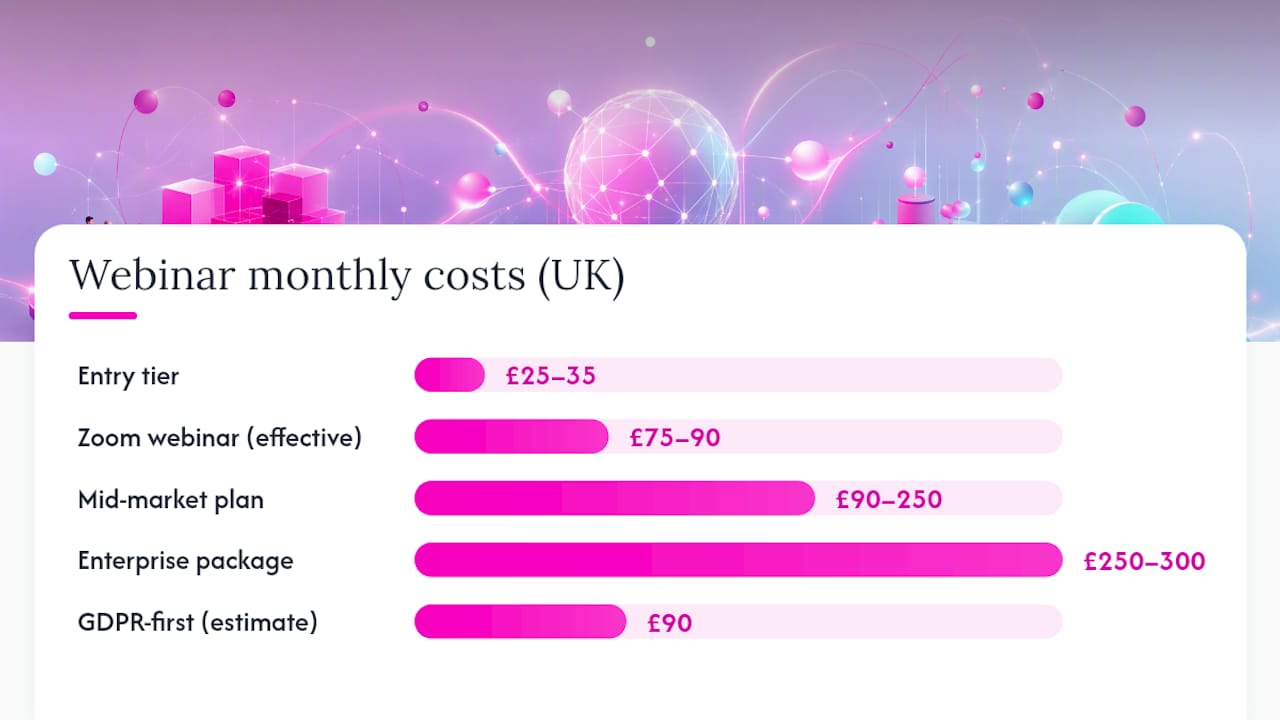
Enterprise packages start from around £250 to £300 per month and rise into bespoke custom pricing for organisations needing guaranteed EU data residency, dedicated support and AI-driven post-production modules. These deals are typically negotiated directly rather than bought off a pricing page.
Common add-ons that catch organisers out include extra attendee-tier upgrades, cloud storage beyond the included allowance, single sign-on (SSO) for enterprise identity management, dedicated onboarding, and AI-generated highlight reels or transcripts. None of these are usually included in the headline price.
| Cost element | Attendee-tiered vendor | GDPR-first / flat vendor |
|---|---|---|
| Base monthly licence | £75–90 (Zoom Webinar add-on) | £90 (EU data residency package) |
| 500 additional attendees | +£40/month | Often included up to plan cap |
| SSO for enterprise identity | +£15/month | Frequently bundled at mid-tier |
| AI post-production/highlights | Add-on, priced separately | Sometimes bundled from enterprise tier |
| Estimated monthly total (12-month programme, ~500 attendees) | £130 | £90 |
For a 12-month programme running monthly webinars to around 500 attendees, an attendee-tiered vendor can end up costing more overall than a flat-rate, GDPR-first alternative, even when its headline price looked cheaper on the pricing page. Run the full 12-month total before signing, not just the first invoice.
What does it take to run a broadcast-quality hybrid webinar?
Software handles the platform side. The moment a webinar involves a physical stage, multiple cameras or a live room audience, the production layer determines whether the stream actually looks and sounds professional, and that is where Firefly AV’s day-to-day work sits.
Kit that changes the outcome
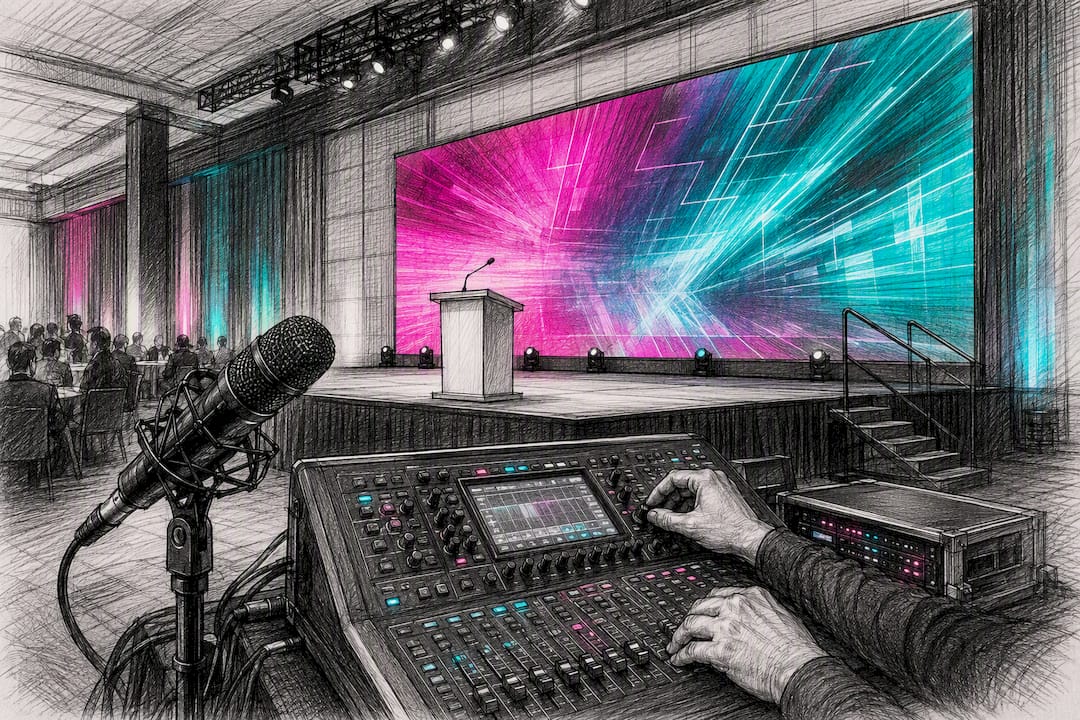
An Absen LED wall behind a presenter reads far better on camera than a pull-up banner, and it doubles as the confidence monitor for slides and branding. Where a projected image is more practical than an LED wall, Panasonic projectors handle larger screen sizes at lower day rates. Sennheiser mics remain the standard for clean presenter and panel audio, radio mic drop-outs are one of the most common causes of a webinar recording becoming unusable. An Allen & Heath console lets an audio technician mix multiple presenter mics, a panel discussion and video playback into one clean feed for the stream. DB Technologies speakers cover the room for any in-person audience without bleeding into the microphones feeding the online broadcast. Birddog cameras output clean NDI or SDI feeds that a vision mixer can switch between multiple angles live, and a device such as the Blackmagic Web Presenter converts that SDI or HDMI signal into something the webinar platform can actually ingest. For staging, Lite Deck platforms give presenters proper stage height and separation from the audience, which matters both for sightlines in the room and for camera composition.
Day rates and crew
A single camera operator, vision mixer and audio technician typically runs as a day-rate package rather than three separate invoices, and packages commonly fall between roughly £600 and £1,200 per day for a small crew, depending on region, event duration and whether rehearsal time is included. Adding an LED wall, projector, or extra camera angles pushes the combined kit and crew day rate higher, often into the £1,500 to £3,000 range for a fuller hybrid production, though the actual figure depends heavily on venue access, get-in time and how many technicians the show requires. Firefly AV’s guidance on audio visual equipment for event planners breaks down how kit and staffing costs should be itemised separately so organisers can see exactly what they are trading off, rather than accepting one bundled number.
| Production element | Typical UK day rate (GBP) | Main cost variable |
|---|---|---|
| Camera operator + camera | £250 | Number of cameras and event duration |
| Vision mixer + technician | £300–500 | Multi-scene complexity, number of feeds |
| Audio technician + console | £300–500 | Number of mic channels, live PA requirement |
| LED wall package | £800+ | Wall size, resolution, install/strike time |
| Full small crew package (3 roles) | £600–1,200 | Rehearsal time, travel, kit bundled or separate |
Operational checklist for hybrid broadcasts
Uplink redundancy matters more than almost anything else on the list, a single internet connection is a single point of failure, so any broadcast-critical event needs a primary and secondary connection with automatic failover. Vision routing needs to be planned in advance so the mixer knows which camera feeds which scene at which moment, not decided live. Captioning and accessibility workflows should be tested during rehearsal, not assumed to work on the day, Firefly AV’s approach to virtual and hybrid event production treats accessibility as a rehearsed workflow rather than a bolt-on setting. Separate audio submixes are needed for the room PA and the stream feed, because what sounds right in a live room is often too hot or too quiet for an online audience. Finally, full run-throughs with key speakers should happen close enough to the live date that any changes are still fixable, but early enough that problems do not become last-minute panic.
Pro Tip: Ask any production partner to itemise kit and crew separately on the quote. A bundled day rate hides which single item is driving the cost, and you cannot negotiate what you cannot see.
How do you choose the right webinar platform? A decision checklist
Work through this in order rather than starting with a feature comparison, most organisers who skip straight to comparing feature tables end up buying capability they never use.
- Define the event goal first. Lead generation, internal training, public broadcast and evergreen education all need different tools; do not shortlist software before this is settled.
- Map the required attendee experience. Decide whether attendees need interactive breakouts, simple watch-and-chat, or a full virtual-event lobby.
- Assess your production capability. If the event involves a physical stage, multiple cameras or an LED wall, treat this as a production decision first and a software decision second.
- Check integrations and data ownership. Confirm the platform syncs with your CRM and marketing stack, and clarify who owns recorded content after the event ends.
- Set budget and required SLA. Decide your ceiling before demos start, vendors will always find a tier that fits if you tell them the number.
- Run a pilot or rehearsal. Never commit to an annual contract without testing the platform on a real, if small, live event first.
Put these questions directly to any vendor before signing:
- What is our guaranteed attendee capacity, and what happens if we exceed it mid-event?
- Where is our data stored, and does that satisfy our GDPR obligations?
- Who owns the recorded content and transcripts after the contract ends?
- Which CRM and marketing platforms does this integrate with natively, versus needing a third-party connector?
- What accessibility support (captioning, screen-reader compatibility) is included versus paid separately?
- What is the actual support SLA, response time in hours, not just “priority support” as a label?
Watch for vagueness around data residency, surprise per-attendee fees that only appear once you exceed a threshold, and any vendor unwilling to offer a trial or pilot event before a full contract.
Why platform features matter less than most buying guides suggest
Most webinar platform comparisons treat this as a software decision. It rarely is. The platform choice determines what attendees can click on, but the AV build behind it determines whether the event actually looks and sounds like it was worth attending, and that gap is where most webinars quietly fail.
The conventional advice, compare feature lists, pick the cheapest tier that covers your attendee cap, ignores that a webinar’s perceived quality comes overwhelmingly from audio clarity and visual composition, not from which polling widget is used. A £90-a-month platform with a properly mic’d presenter and one clean camera angle beats a £300-a-month enterprise tier streaming off a laptop webcam every time.
If you take one thing from this guide, prioritise the production layer before the software tier whenever the event matters to your brand, a sales pitch, a public briefing, an awards stream. Software is replaceable mid-contract. A badly produced broadcast in front of your biggest client is not.
— Michael
Firefly AV: managed virtual and hybrid production services
Choosing the platform is half the job; making it look and sound like a professional broadcast is the other half, and that is where organisers most often run out of in-house expertise. Firefly AV supplies the physical production layer behind virtual and hybrid webinars: lighting, sound, LED wall and vision, staging, and the technicians and vision mixers to run it live, from bases in Leeds and Preston working across the UK. We have delivered technical production for clients including the BBC, Leeds City Council and the University of Bradford, so the crews and kit are used to broadcast-standard stakes, not just internal meetings.
Choose a managed production partner over running it in-house when the audience is large, the branding needs to be flawless, accessibility support has to actually work on the day, or the event simply cannot afford a dropped connection. If any of that describes your next webinar, browse our AV equipment hire range or get in touch to request a quote or arrange a site visit before you commit to a platform or a date.
FAQ
What are the top webinar platforms available today?
There is no single top ten that fits every organiser; the strongest options split by use case, enterprise broadcast tools such as GoTo, lead-generation platforms with strong CRM integration, evergreen/simulated-live tools, and virtual-event platforms such as vFairs that embed external webinar tools for multi-track events.
Are webinars still effective in 2026?
Yes, particularly when paired with good production and follow-up automation; evergreen and simulated-live formats specifically can outperform live-only webinars for course creators when combined with strong post-event asset workflows.
What is the cheapest webinar platform?
Entry-level options typically start around £25 to £35 per month, though platforms like Zoom often require an existing workplace licence on top of the webinar add-on, pushing the effective monthly cost closer to £75 to £90.
What is the best free webinar software?
Most mainstream platforms offer a limited free or trial tier suitable only for very small internal meetings, generally capped at low attendee numbers and stripped of branding, analytics and recording features, adequate for a quick internal test but not for an external or branded event.
Do I need a production company for a webinar, or just software?
For simple internal or small lead-gen webinars, software alone is sufficient; once the event involves a physical stage, multiple cameras, an LED wall or a hybrid audience, a production partner such as Firefly AV becomes necessary to deliver broadcast-standard results.
How much does a hybrid webinar production crew cost in the UK?
A small crew covering camera, vision mixing and audio typically runs between roughly £600 and £1,200 per day, rising to £1,500 to £3,000 or more once an LED wall or additional cameras are added, depending on venue, duration and rehearsal time required.