Breakout room AV for event planners: what you need
Date added: 2/08/2026
A breakout room AV package is the complete set of audio, vision, control, and connectivity equipment — plus technician support — that enables a smaller concurrent session to run independently of the main stage. You need it whenever your conference splits into parallel tracks, workshops, or panel discussions that require their own sound reinforcement, display, and presenter support. At minimum, that means a projector or display, at least one wireless microphone, a speaker system sized to the room, and a technician who can keep it all running.
Firefly AV is an AV hire and event production company based in Leeds and Preston, working across the UK. The kit examples throughout this guide reflect what Firefly AV stocks and deploys on multi-track conference work: Absen LED panels, Panasonic projectors, Sennheiser microphones, Allen & Heath mixing consoles, DB Technologies speakers, BirdDog cameras, and Lite Deck staging.
Quick planning baseline: for a breakout room of up to 80 people, book at minimum a projector or 65" display, one wireless handheld or lavalier mic, a compact PA, a laptop input with HDMI and USB-C adapters, and one breakout operator shared across no more than two adjacent rooms.
Key takeaways
Breakout room AV requires a scaled-down but complete package of vision, audio, control, and connectivity equipment, plus a dedicated operator, to run concurrent sessions reliably alongside a main conference programme.
| Point | Details |
|---|---|
| Minimum kit per room | Projector or display, one wireless mic, compact PA, HDMI input, and a confidence monitor cover most formats. |
| Budget guidance | Per-room AV usually adds an amount that varies with screen size, recording, and hybrid needs. |
| Staffing model | One breakout operator per room (or shared across two simple rooms) plus a roving technician for escalations. |
| Hybrid rooms need wired network | Use wired Ethernet and a dedicated VLAN for encoders; Wi-Fi alone causes stream dropouts in multi-room events. |
| Firefly AV | Supplies complete breakout room packages from Leeds and Preston, covering kit hire, operators, and hybrid streaming UK-wide. |
Table of Contents
- How does breakout room AV differ from a main session?
- What baseline AV kit does a breakout room need?
- How do you size screens and projectors for breakout rooms?
- How do you get audio right in a breakout room?
- Do breakout rooms need cameras and hybrid streaming?
- What are the best practices for cabling and signal routing?
- What does a breakout room setup timeline look like?
- What does a breakout operator actually do?
- What are the most common breakout room AV problems?
- Practical checklist and sample kit packages with UK pricing
- A field note from Firefly AV on running breakout rooms
- Firefly AV: AV hire and production for breakout rooms across the UK
- Sources
- FAQ
How does breakout room AV differ from a main session?
Breakout rooms are smaller meeting spaces adjacent to the main conference area, used for concurrent sessions, workshops, and small-group discussions. Their AV needs are structurally different from a plenary, not just smaller.
A general session typically carries IMAG (image magnification) with multiple cameras, confidence monitors, a full stage lighting rig, a multi-channel mixing console, and a dedicated crew of four or more. Breakout rooms strip most of that back:
- Vision: one projector or flat-panel display rather than a multi-screen IMAG rig; no front-of-house camera operator
- Audio: one or two wireless mics, a compact PA, and a simple mixer rather than a 32-channel console with IEM feeds
- Lighting: basic room wash or existing venue fluorescents rather than a full theatrical rig
- Crew: one breakout operator per room (or shared across two rooms) rather than a dedicated crew per discipline
- Cabling footprint: a single stage box and short runs rather than a full multicore from stage to FOH
The operational differences matter just as much as the kit list. Multiple breakout sessions run simultaneously, which means quick turnarounds between speakers, noise bleed risk from adjacent rooms, and the need to route feeds independently if you are recording or streaming. A plenary AV failure stops the whole event; a breakout failure affects one track. That changes how you staff and how you escalate.
Deciding how many breakout rooms you need depends on expected take-up and track count. Attendance is rarely distributed equally across sessions, so build in flexible capacity and be ready to reallocate rooms for popular tracks.
Pro Tip: Brief your breakout operators on the full event schedule, not just their own room. Knowing when the plenary ends tells them exactly how long they have for a turnaround.
What baseline AV kit does a breakout room need?
Standard breakout room setups are scaled down from general session AV. The minimum package for most rooms covers five categories: vision, audio, control, connectivity, and staging.
Vision
- Projector: a Panasonic short-throw or standard-throw projector for rooms with a screen and controlled ambient light
- LED panel: an Absen LED panel where ambient light is high, throw distance is short, or the room requires a permanent-looking install
- Screen or display surface: a pull-up screen, fixed frame, or 65"–86" flat panel for smaller rooms under 40 people
- Confidence monitor: a secondary display facing the presenter so they can see their slides without turning to the main screen
Audio
- Wireless handheld mic: Sennheiser handheld for presentations and Q&A
- Lavalier mic: Sennheiser clip-on for panel speakers who need hands-free delivery
- Boundary mic: for round-table or workshop formats where participants speak from fixed positions
- Compact PA: DB Technologies active speakers, positioned to cover the room without feedback into open mics
- Mixer: an Allen & Heath compact console or a simple two-channel mixer for basic gain control and EQ
Control, connectivity, and staging
- Laptop input: HDMI and USB-C inputs at the lectern or table, with adapters for older MacBooks and Windows machines
- Presentation switcher: a simple HDMI switcher so multiple presenters can connect without re-patching
- Lite Deck staging: low-profile stage decking where a raised platform is needed for sightlines in deeper rooms
- BirdDog PTZ camera: for rooms that require recording or a hybrid feed to remote delegates
The format of the session shapes which elements you prioritise. A training room with 30 delegates at tables needs tabletop boundary mics and multiple HDMI inputs. A panel of four speakers needs two or three lavaliers and a front-fill speaker to cover the stage. A hands-on workshop with rotating presenters needs a wireless presentation system and flexible input routing.
How do you size screens and projectors for breakout rooms?
Getting the screen size wrong is one of the most common breakout room mistakes, and it usually goes in one direction: too small. A useful rule of thumb is that the screen width should be at least one-sixth of the farthest viewing distance. For a room where the back row sits 9 metres from the screen, you need a screen at least 1.5 metres wide.
Projector lumen guidance
- Up to 50 people, controlled light: 3,500–5,000 lumens is sufficient for a standard pull-up screen with blinds drawn.
- 50–150 people, mixed ambient light: 5,000–8,000 lumens handles most hotel conference rooms with partial daylight.
- 150–300 people, high ambient light: 8,000 lumens or above, or switch to an Absen LED panel, which produces its own light and is unaffected by room brightness.
- Short-throw situations: where throw distance is under 2 metres, a short-throw Panasonic projector or a flat panel avoids the presenter casting a shadow on the screen.
When to choose LED over projection
Absen LED panels are worth specifying when the room has floor-to-ceiling glazing, when the content is video-heavy and colour accuracy matters, or when the setup needs to look polished without a visible projector and rigging. The trade-off is cost: LED hire runs higher than a projector and screen, so for a basic training room with 30 delegates and controlled light, a Panasonic projector remains the practical choice.
Seating layout affects required screen size and placement. Theatre-style rows push the back row further from the screen, demanding a larger image. Classroom layout with tables is more forgiving because delegates sit closer. Rounds (cabaret) create sightline problems for delegates seated with their backs to the screen; in that format, consider two smaller displays on opposite sides of the room rather than one central screen.
Pro Tip: Always confirm the projector’s throw ratio against the actual room dimensions before the event, not just the venue’s floor plan. Ceiling height, rigging points, and furniture placement regularly differ from the drawing.
How do you get audio right in a breakout room?
Audio is where breakout rooms fail most visibly. A presenter who cannot be heard, a mic that feeds back, or a speaker that only covers half the room will derail a session faster than any vision problem.
Mic selection
- Sennheiser handheld wireless: the default for single-presenter formats; easy to hand to audience members for Q&A
- Sennheiser lavalier: better for panel sessions where speakers need both hands free; clip to a lapel or tie
- Boundary mic: flat on a table, picks up all voices within roughly a metre; suited to round-table discussions and workshops where a handheld would be impractical
- Headset mic: for high-energy presenters who move across the stage and need consistent gain regardless of head position
Speaker placement and DB Technologies PA
DB Technologies active speakers are compact enough for breakout rooms and powerful enough to cover 200 people when positioned correctly. Place them at the front of the room, angled slightly inward, at or above head height. For rooms wider than 10 metres, add a second pair of fills at the sides to avoid a dead zone at the edges. Avoid placing speakers behind open microphones; that is the fastest route to feedback.
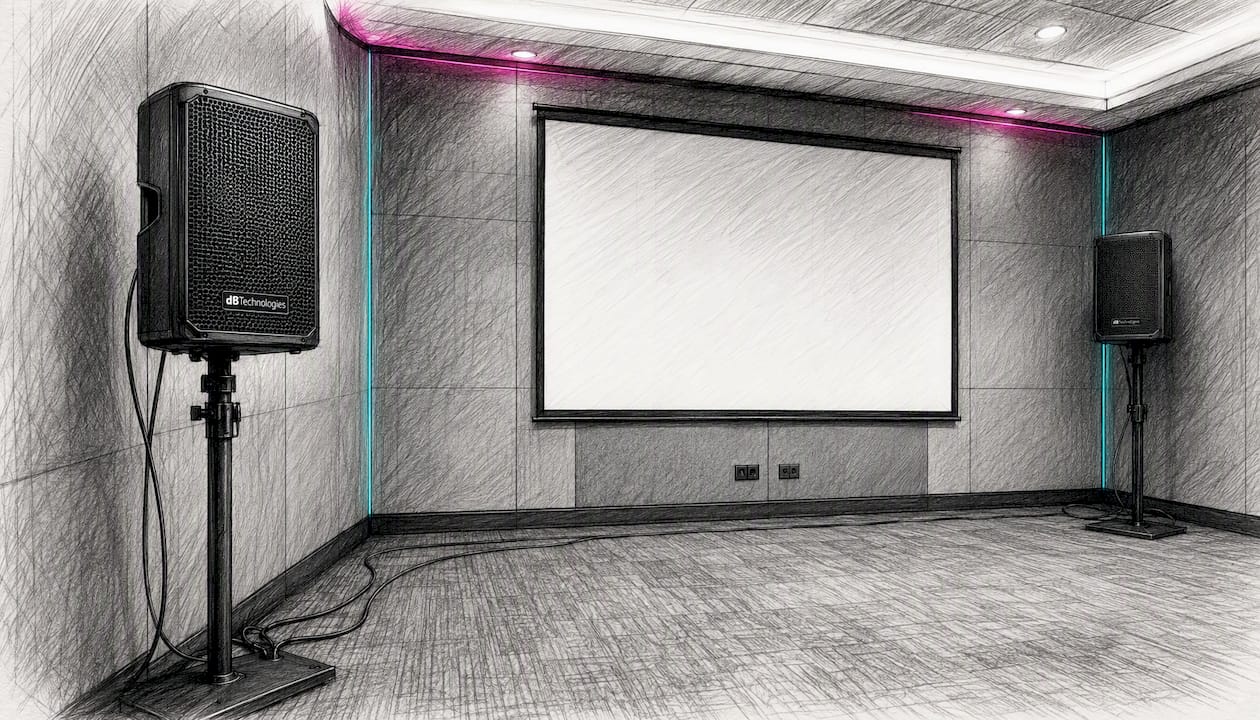
Ceiling-mounted distributed speakers work well in rooms with low ceilings and a permanent install, but they rarely provide enough gain for a presenter mic in a live event context. Stick with front-of-house active speakers for anything requiring reinforcement above a conversational level.
Mixing and gain structure with Allen & Heath
An Allen & Heath compact mixer gives a breakout operator enough control to set individual channel gains, apply basic EQ, and manage monitor sends without needing a full-size console. Set gain at the preamp stage first, then bring up the fader. Keep mic channels at unity gain with EQ applied to cut problem frequencies (typically 200–400 Hz for muddiness, 2–4 kHz for harshness) before the session starts. A high-pass filter on every mic channel at around 80 Hz removes handling noise and low-frequency rumble.
For accessibility, check whether the venue has an induction loop system and whether your audio feed needs to be routed into it. Live captions via a captioning service or AI transcription tool require a clean audio feed from the mixer’s aux or direct output. Plan that routing during the tech check, not during the session.
Pro Tip: Do a full gain structure check with the presenter speaking at their actual volume, not a polite soundcheck voice. Most feedback problems happen because the gain was set for a quiet run-through and the presenter then projects to the room.
Do breakout rooms need cameras and hybrid streaming?
Not every breakout room needs a camera, but the question is worth answering at the planning stage rather than the morning of the event. Recording a session for post-event distribution is a different technical requirement from live-streaming it to remote delegates, and both differ from feeding a hybrid breakout where virtual attendees participate in real time.
Camera options
- BirdDog PTZ camera: the practical choice for breakout rooms; remotely controllable, compact, and capable of clean 1080p or 4K output without a dedicated camera operator
- Fixed wide-angle camera: simpler and cheaper for record-only use cases where a static wide shot of the presenter is sufficient
- Multi-camera setup: only warranted for panel sessions where you want to cut between speakers; adds cost and requires a vision mixer or a BirdDog controller
Encoding and streaming
- Hardware encoder: more reliable than a software encoder for live streams; connects directly to the camera output and sends a stable RTMP feed to your streaming platform
- Software encoder (OBS or similar): lower cost, suitable for record-and-upload workflows where a dropout does not affect a live audience
- Record-and-upload: the lowest-risk option for most breakout rooms; capture to a local drive, edit lightly, and distribute after the event
Network and connectivity
Hybrid breakout rooms need sufficient network capacity, professional meeting controls, screen sharing, recording, live captions, and secure guest access. For multiple concurrent streams, wired Ethernet to each encoder is non-negotiable. Segregating AV traffic on a dedicated VLAN significantly reduces stream dropouts compared with shared Wi-Fi. Budget at least 5 Mbps upload per stream at 1080p, and confirm the venue’s uplink capacity before committing to a live-stream format.
For presenter workflows in hybrid sessions, agree in advance how remote guests will join (Zoom, Teams, or a dedicated platform), who manages the waiting room, and what the latency expectation is. A 2–4 second delay is normal for RTMP streams; interactive hybrid sessions need a lower-latency protocol or a dedicated conferencing platform rather than a broadcast stream.
What are the best practices for cabling and signal routing?
Cabling failures in breakout rooms are almost always preventable. They happen because runs are unlabelled, adapters are missing, or signal paths were not tested before the presenter walked in.
Control and signal routing
- Use a simple HDMI or SDI switcher at the lectern so presenters can connect without re-patching the projector
- Route a confidence monitor feed from the switcher output so the presenter sees exactly what the audience sees
- For rooms with a BirdDog camera, run SDI rather than HDMI for runs over 10 metres; SDI is more reliable over distance and does not have HDCP handshake issues
Cabling best practice
- Label every cable at both ends with the room number and signal type (e.g. “Room 3 — HDMI Projector”)
- Use balanced XLR runs for all audio; unbalanced jack leads over 5 metres pick up interference in busy venues
- Keep HDMI runs under 10 metres without an active extender; beyond that, use HDBaseT or SDI
- Colour-code power leads separately from signal leads to avoid accidental disconnection during a session
UK power planning
UK venues vary considerably in what they provide. Confirm the available circuits, their amperage, and whether they are on the same phase before load-in. Use a power distribution board with RCDs for each breakout room rather than daisy-chaining from a single 13A socket. A fused spur or dedicated 16A commando socket is preferable for a PA system and projector on the same circuit. Older venues frequently lack adequate HDMI inputs; always carry a kit of adapters (USB-C to HDMI, DisplayPort to HDMI, VGA to HDMI) and test presenter laptop compatibility during the tech check.
Day-of cabling checklist
- Confirm all signal paths from source to display are tested with a live signal, not just connected
- Check that all audio channels are labelled on the mixer and that gain is set before the presenter arrives
- Verify that the confidence monitor is showing the correct source
- Confirm power distribution is on a protected circuit with RCDs in place
- Walk the cable runs and tape down any trip hazards
What does a breakout room setup timeline look like?
Timing is the discipline that separates a smooth multi-track event from a chaotic one. The table below shows a realistic timeline for a single breakout room on a one-day conference.
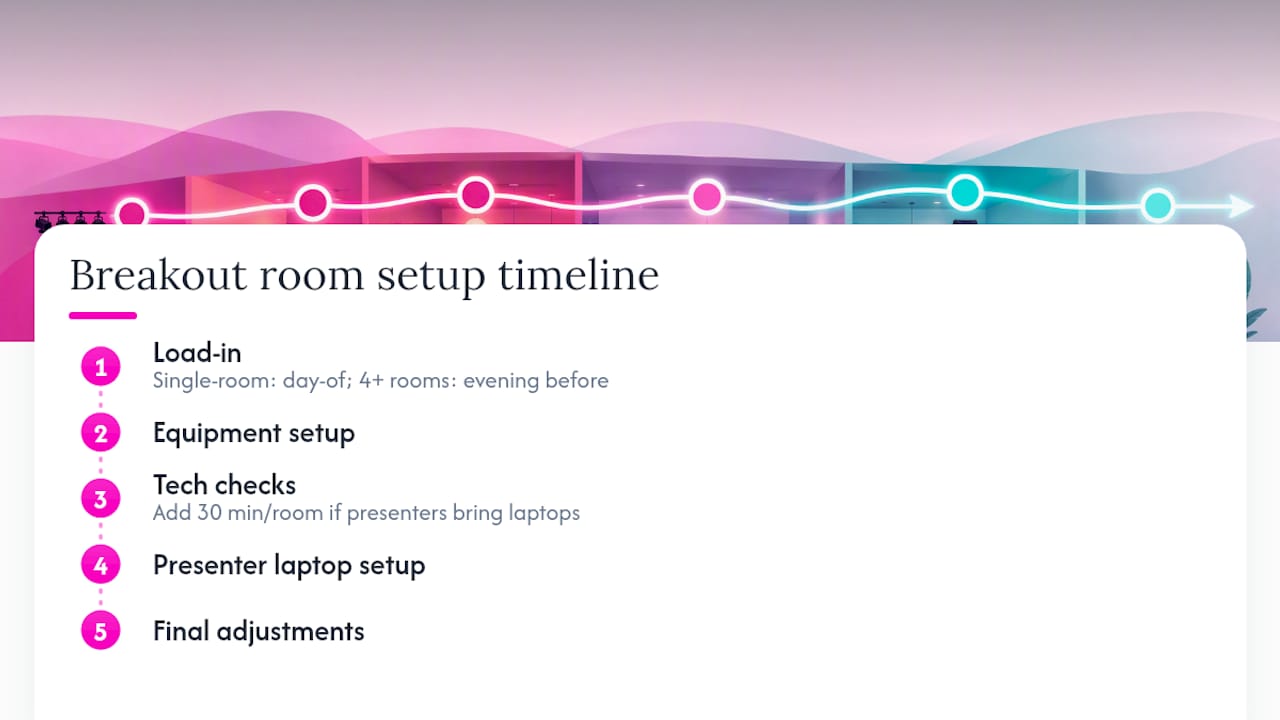
For a multi-room event with four or more breakout rooms, load-in typically starts the evening before. Allow an additional 30 minutes per room for tech checks if presenters are using their own laptops.
Staffing levels and UK day rates
The standard model is one breakout operator per room for high-value sessions, or one operator shared across two adjacent rooms for simpler formats. A roving technician covers escalations and cross-room support. Day rates vary by role, location, experience, and complexity, with higher rates common in London and for specialized skills. Rates also increase for early starts, late finishes, overnight load-ins, and specialist work.
What does a breakout operator actually do?
A breakout operator is a specialised AV technician who supports presenters with microphones and equipment, operates local video and audio consoles, manages basic lighting, troubleshoots technical issues, and assists with pack-down. They are often the only direct technical contact a presenter has during a session, which makes communication skills as important as technical ability.
Day-to-day duties
- Meet the presenter before the session, confirm their laptop input, and walk them through mic handling
- Set up and test the confidence monitor so the presenter can see their slides without turning away from the audience
- Manage mic handoffs during Q&A without interrupting the session flow
- Adjust room lighting for presentations versus discussion formats
- Troubleshoot input issues, audio dropouts, and display problems in real time
- Complete a pack-down checklist and report any equipment faults to the lead tech
Skills to hire for
- Mixing basics: gain staging, EQ, and feedback avoidance on a compact console
- Familiarity with at least one lighting console for basic room wash control
- Confident, calm communication with presenters under time pressure
- Rapid fault diagnosis: knowing whether a signal problem is at the source, the cable, or the display
Breakout operators are often the only direct technical contact presenters have; strong customer service and clear presenter scripting reduce errors and session delays significantly.
Firefly AV field tips
From Firefly AV’s work on multi-track conferences in Leeds and Preston, three practices consistently reduce session delays. First, prepare a one-page presenter brief covering mic handling, slide advance, and what to do if the display goes blank. Second, use a stage box at the lectern so all presenter inputs patch to a single point rather than running directly to the rack. Third, run a full signal-path test with a live laptop, not just a test pattern, before each session block.
Pro Tip: Keep a “breakout spares bag” at every room: spare HDMI cable, USB-C adapter, gaffer tape, a spare mic battery or charged pack, and a printed signal map. Most session delays trace back to a missing adapter or a flat battery.
What are the most common breakout room AV problems?
Most breakout room failures fall into five categories. Knowing the fix before the event is faster than diagnosing it under pressure.
Common issues and quick fixes
- Noise bleed from adjacent rooms: check partition wall sealing, reduce speaker volume and aim speakers away from shared walls, and use directional mics rather than omnidirectional boundary mics
- Mic feedback: reduce gain on the offending channel, check speaker placement relative to open mics, apply a high-pass filter and cut 2–4 kHz on the EQ
- Incorrect input resolution: presenter laptop outputs at a resolution the projector cannot accept; fix by setting the laptop to 1920×1080 before connecting, or use a scaler at the input
- Presenter laptop HDMI not detected: try a different cable first, then a different adapter, then a different input port on the switcher; carry a USB-C to HDMI adapter for every room
- Network dropout during a hybrid session: switch from Wi-Fi to wired Ethernet immediately; if wired is unavailable, reduce stream bitrate and resolution to stabilise the connection
Prevention during load-in
- Test every cable with a live signal before the presenter arrives
- Confirm laptop compatibility with at least one test machine during the tech check
- Set gain structure with the presenter speaking at full volume, not a quiet test voice
- Verify network connectivity and upload speed before committing to a live stream
- Walk the room for noise bleed with the adjacent room’s PA running at session volume
When a problem cannot be resolved within two minutes, escalate to the lead AV or site technical contact immediately. Do not spend five minutes on a fault that requires a different tool or a venue engineer.
Practical checklist and sample kit packages with UK pricing
Day-one checklist per breakout room
- Display or projector focused and signal tested
- Screen or panel at correct height for sightlines
- All mic channels patched, labelled, and gain-set
- Confidence monitor showing correct source
- Laptop inputs tested with a physical machine (HDMI and USB-C)
- PA positioned and level-checked at session volume
- Power distribution on RCD-protected circuit
- Spare cables, adapters, and mic batteries in the room
- Signal map printed and with the operator
- Room access confirmed with venue (key, code, or contact)
Sample kit packages and GBP day-rate guidance
The table below shows three common breakout room configurations. Prices are indicative day-rate ranges for Leeds and Preston; London bookings typically add 20–30% to the equipment and labour figures.
Optional add-ons include live captioning (requires a clean aux feed and a captioning service), an additional BirdDog camera for multi-angle recording, and a dedicated streaming technician for managed live output.
A field note from Firefly AV on running breakout rooms
The detail that catches planners out most often on multi-track events is not the kit list. It is the turnaround. On a recent conference handled by Firefly AV across multiple rooms in Leeds, the schedule called for 10-minute changeovers between four consecutive speaker slots in the same room. That sounds generous until you factor in a presenter who arrives two minutes before their slot, a laptop that outputs at 4K (which the projector cannot accept), and a mic battery that was not swapped at the previous changeover.
The fix is procedural, not technical. Firefly AV’s operators use a short turnaround checklist: swap the mic pack, reset the confidence monitor source, confirm the new presenter’s laptop input, and do a 30-second audio check. That sequence takes under three minutes when it is practised. The remaining seven minutes are buffer, and buffer is what keeps a multi-track event on schedule.
Firefly AV operates from Leeds and Preston and covers events across the UK, supplying everything from a single breakout room package to full multi-room conference production with hybrid streaming, LED walls, staging, and crew. The portfolio covers conferences, corporate events, exhibitions, and broadcast work.
Firefly AV: AV hire and production for breakout rooms across the UK
Firefly AV supplies complete breakout room AV packages for conferences and multi-track events across the UK, from a single-room hire in Leeds to a 10-room multi-track production in London. The difference from booking kit piecemeal is having a single point of contact who has already solved the turnaround problem, the laptop compatibility problem, and the noise bleed problem on dozens of events before yours.
Equipment hire covers Panasonic projectors, Absen LED panels, Sennheiser wireless mic systems, Allen & Heath consoles, DB Technologies PA, BirdDog PTZ cameras, and Lite Deck staging. Breakout operators, roving technicians, and AV project managers are available with every package. For hybrid sessions, Firefly AV provides hybrid event AV including encoding, streaming, and network planning. Dry hire is available on a two-day hire week for planners who supply their own crew.
Firefly AV’s bases in Leeds and Preston mean fast logistics for events across the North of England, with full UK-wide delivery and crew deployment. To get a bespoke quote or arrange a site survey, visit the AV equipment hire page or contact the team directly.
Sources
- Breakout Room | Events Glossary | AMW®
- Guide to Setting Up a Conference Room for Hybrid Events
- What is a breakout room and how many do you need?
FAQ
What is the purpose of a breakout room at a conference?
A breakout room provides a dedicated space for smaller concurrent sessions, workshops, or group discussions that run alongside the main programme. It allows conferences to serve multiple audience interests simultaneously without requiring everyone to attend the same content.
What AV equipment does a breakout room need?
At minimum, a breakout room needs a projector or display, at least one wireless microphone, a speaker system sized to the room, a laptop input with HDMI connectivity, and a confidence monitor for the presenter. Hybrid or recorded sessions add a camera, encoder, and wired network connection.
How many technicians do you need for breakout rooms?
The standard model is one breakout operator per room for complex or high-value sessions, or one operator shared across two simple adjacent rooms. A roving technician should cover every two to four rooms to handle escalations and turnaround support.
Why can’t some presenters access breakout room AV?
The most common cause is laptop compatibility: older venues often lack adequate HDMI inputs, and presenters arrive with USB-C-only machines or laptops that output at resolutions the display cannot accept. Carrying a full adapter kit and testing presenter laptops during the tech check prevents most of these failures.
How much does breakout room AV cost in the UK?
Per-room AV typically adds £800–£2,500 per day depending on screen size, whether the session is recorded or hybrid-enabled, and the city. London bookings generally run 20–30% above Leeds and Preston rates for equivalent kit and crew.